 North Shore Plant Club
- Shop For Plants
- Search Plants
- Resources for Gardeners
- Color Wheel of Plants
- Interactive Landscapes
- Photos of Planters & Hanging Baskets
- September Photos from Our Community
- Botanic Gardens: Chicago & Beyond
- Local Nurseries
- Upcoming Plant Events
- Plant Club Articles & Answers
- Gardening in the News
- Chicagoland Garden Calendar
- Explaining Plant Container Sizes
- Thrillers, Fillers & Spillers
- Join Free!
- Mundelein
Sep 9, 2026
Why Do Plants in My Cart Sometimes Disappear?
We regularly track the availability of local wholesale nurseries. Every single day we learn about new crops that are ready to go and looking good, and that other items have sold out. The Plant Club website reflects that information as soon as we know. We add warnings to the plant detail page when we're worried about low availability of an item, but even when plant availability looks sufficient weird things can happen: a retail nursery might buy a whole rack of the plants zeroing out the supply, or the nursery may note an issue with the plants and remove them from their "salable" list.
In addition to real-time plant count movement, our availability often changes when the Plant Club starts ordering plants for a different date. Not only does the delivery date change, some items may only be available before or after a particular date... which affects what plants we can get when. Our email newsletter and social media will remind you when we're about to place an order to make sure you get the plants you want when you want them.
The longer you let items linger unpurchased in your cart, the higher the risk that the specific plant/size/delivery date you've selected may no longer be available.
If we can't get a plant you'd previously selected, it will disappear from your shopping cart. When you next click into your shopping cart, you'll get a warning and an invitation to add it to your wish list so you can easily find that item when it is available again.
If you want to make sure to get a particular item at a particular time, don't dither. But if you missed out, don't fret: take a look at the availability history for that plant... many plants are sold by multiple nurseries — and even the same nursery may have multiple crops of a plant in a year — so another crop may be available soon!
If you want to proactively remember what you added to your shopping cart or make it easier to find a plant again, try adding the plant to your WishList:
- Click on the shopping cart (assuming you're already logged in)
- Click on the plant name, which is a link that takes you to the plant page.
- Choose - "Save to: My Wishlist." This will gather selected plants.
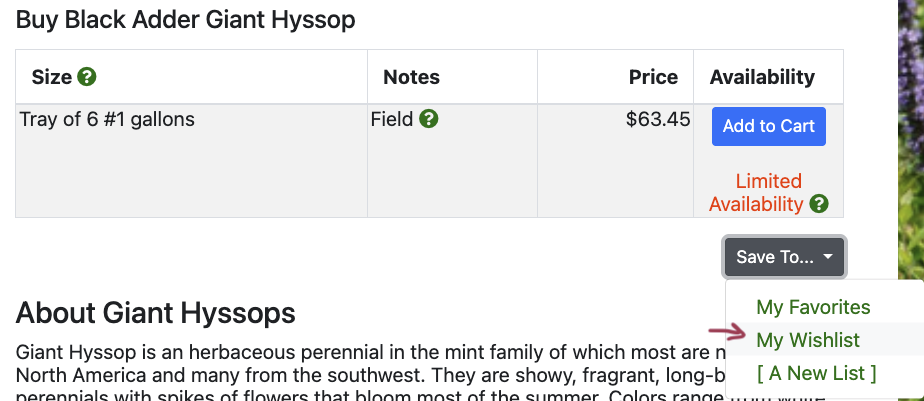
When logged into your account, you can view My Wishlist to see your favored plants available for purchase on the next delivery day, and add them back to your cart. Your wishlist is under the menu with your name at the top right of the screen on a computer, and under the hamburger icon at the top left on a cell phone.